Who’s on the Digital Keyring? A Smart-Lock Access Audit for UK Homes
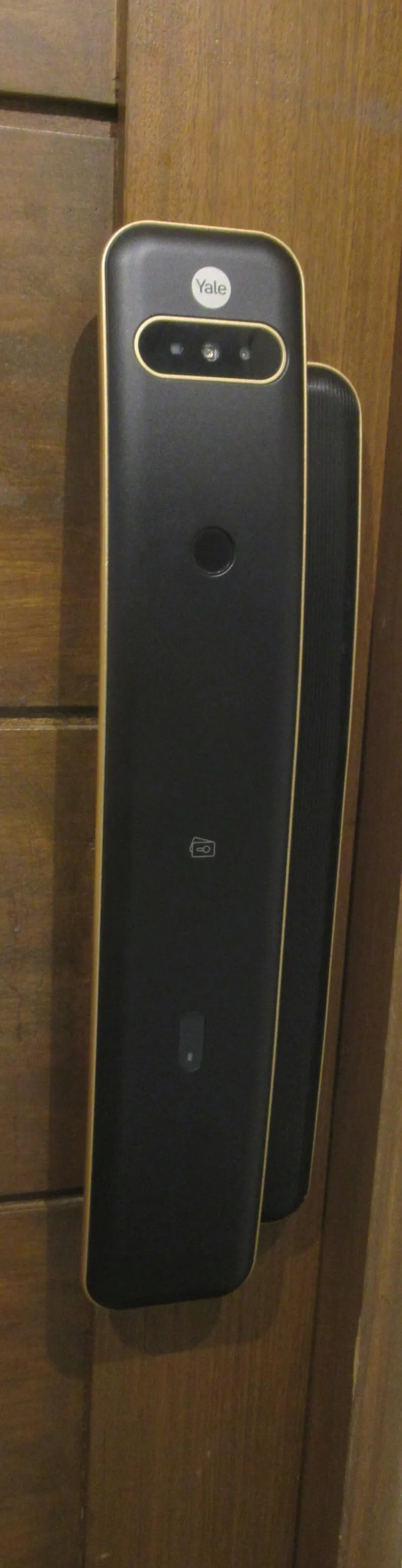
Photo: Unknown, CC BY-SA 4.0, via Wikimedia Commons
In 2026, a smart lock is less a gadget than a tiny access-control system bolted to your front door. It can let in a cleaner at 9am, a delivery driver at 2pm and your sister at the weekend — often without you being anywhere near the flat. That is genuinely useful. It also means your door has a guest list, a history and a set of permissions that can go stale quietly.
The point of an access audit is not to bin the lock and go back to a key under a flowerpot. It is to make sure the digital keyring matches the life you are actually living. Ex-flatmates, former cleaners, old dog-walkers and one-off tradespeople should not linger in an app years after they stopped needing access. Neither should a delivery integration you enabled for a week and forgot about.
Start with the lock’s own guest list
Open the manufacturer’s app and find the user management screen. Names vary — members, users, key holders, guests, admins — but the idea is the same. You are looking for everyone who can unlock the door, change settings or add someone else.
Write the list down. For each person, note whether they are an owner or admin, a standard member, or a time-limited guest. Check who can see access logs and who can issue new keys. If the app lets you add labels, use them. ‘Cleaner — Tuesday mornings’ is more useful than ‘Dave’ when you are reviewing permissions six months later.
Then ask the awkward questions. Does a former flatmate still have a working key? Is the letting agent an admin on the lock? Did you give a neighbour a guest code during a boiler repair and never remove it? This is not about distrust. It is about keeping a small security system tidy.
The log is the story — if it exists
Access logs are the most useful part of a connected lock, and the most variable. Some systems show every unlock with a timestamp, user name and method — app, keypad, physical key, auto-unlock. Others keep only a short history, or push events to a cloud account you rarely open.
Find out what your lock records and how long it keeps it. Can you export the log? Can you filter by user? Does it show failed attempts as well as successful ones? If the answer is ‘no log at all’, decide whether that is acceptable for your home. A lock with no audit trail is still a lock, but it is a weaker one for shared households and rental properties.
Remember that access logs are personal data about the people using your door. If you are a landlord or host, do not casually share screenshots of who came and went. If you are a tenant, you can ask what the building or letting agent records about your flat. The UK GDPR does not vanish because the key is an app.
Temporary keys, deliveries and the cleaner test
Temporary digital keys are where smart locks earn their keep — and where permissions tend to sprawl. The good version is a key that expires after a set window, works once, or is limited to certain days. The bad version is a permanent code shared by text because it was easier at the time.
For deliveries, check whether the courier integration creates a one-time code or a recurring window. A single drop-off should not leave a standing invitation. For cleaners, tradespeople and dog-walkers, create individual users rather than sharing one household PIN. That way the log tells you who opened the door, and revoking access is a single action rather than a group chat announcement.
Also look at auto-unlock and geofencing features. They can be handy if you are carrying shopping, but they may use your phone’s location and leave the door open to anyone standing nearby when your phone is close. Test how it behaves before relying on it.
When the building holds the master key
Renters have an extra layer to check. A landlord or letting agent may have installed the lock, control the admin account, or retain a master key for emergencies. That is not automatically unlawful, but it should be clear. Ask who can open your door without your permission, what the policy is for emergency access, and whether those entries are logged.
If the lock is managed by the building, request the access policy in writing. If you have a physical key override, find out who holds a copy. If the tenancy says you have quiet enjoyment of the property, a connected lock should not become a side door for routine surveillance. A polite email asking how access is recorded and who can see it is a reasonable start.
Locks that phone home
A smart lock is a small computer with a radio. Many need a cloud account, a hub or a bridge to work remotely. That means data leaves your flat: lock state, user IDs, timestamps, perhaps phone location and IP address. None of that is necessarily sinister, but it deserves a look before you trust the front door to it.
Check whether the app supports two-factor authentication, whether firmware updates arrive automatically, and what the privacy policy says about sharing data with partners. If the lock depends on the cloud for basic operation, think about what happens during an outage. Local control options such as Matter or Thread can reduce that dependency, but they are not a magic fix — the app and the lock still need good security hygiene.
A ten-minute access audit
Do this quarterly, and again after a house move, a relationship change, a cleaner leaving or a building management shake-up.
- List every admin, member and guest on the lock.
- Remove anyone who no longer needs access.
- Set expiry dates on temporary keys.
- Review recurring schedules and auto-unlock settings.
- Export or screenshot the access log if the app allows it.
- Check third-party integrations, especially delivery and home-automation links.
- Turn on two-factor authentication if available.
- Confirm firmware updates are current.
- Locate any physical backup key and decide who holds it.
- Change shared codes that have been sent by text or written down.
Questions to ask before trusting a connected lock
Who controls the admin account? Can I see and export access logs? What happens if the internet goes down? Can I revoke a key remotely? Where is my data stored, and who can see it? Does the lock work with local smart-home standards, or is it cloud-only? What happens when I sell or leave the property — can the lock be factory reset and the old account removed?
A good smart lock should make access easier to manage, not harder to understand. The digital keyring is only as secure as its untidiest entry. Audit it now and then, and you can enjoy the convenience without wondering who else still has a way in.